Google Maps - Show all Info Windows
Dejan Agostini
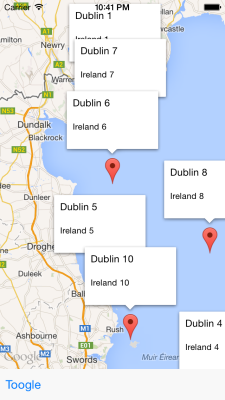
Google Maps for iOS can't show all Info Windows (unlike the Android version). But there's an easy way around this limitation. All you have to do is render your Info Window along with your pin icon as an image, and set that image as a pin icon. Google Maps will render your standard Info Window as an image anyway, but be careful when you render your own Info Windows, because there's a limit on texture atlases in Google Maps (your app will crash if you reach the limit).
So what we want is to get from this:
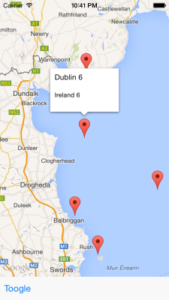 To this:
Assuming you added the Google Maps iOS SDK, create a new nib file (.h and .m files too :) ) that you'll be using as your custom Info Window. You can create a method similar to this one in the implementation file:
To this:
Assuming you added the Google Maps iOS SDK, create a new nib file (.h and .m files too :) ) that you'll be using as your custom Info Window. You can create a method similar to this one in the implementation file:
To this:
Assuming you added the Google Maps iOS SDK, create a new nib file (.h and .m files too :) ) that you'll be using as your custom Info Window. You can create a method similar to this one in the implementation file:
+ (UIImage *)annotationImageWithMarker:(GMSMarker *)marker andPinIcon:(UIImage *)iconImage {

    // Create main info window
    DAMapAnnotationView *infoWindow = [[[NSBundle mainBundle] loadNibNamed:@"DAMapAnnotationView" owner:self options:nil] objectAtIndex:0];
    [infoWindow setMarker:marker];

    // Create container view
    UIView *annotationImage = [[UIView alloc] initWithFrame:CGRectMake(0, 0, infoWindow.frame.size.width, infoWindow.frame.size.height + iconImage.size.height)];
    [annotationImage addSubview:infoWindow];

    // Create icon image, and center it below the view
    UIImageView *iconImageView = [[UIImageView alloc] initWithImage:iconImage];
    iconImageView.backgroundColor = [UIColor clearColor];
    iconImageView.frame = CGRectMake((infoWindow.frame.size.width - iconImage.size.width)/2, infoWindow.frame.size.height, iconImage.size.width, iconImage.size.height);
    [annotationImage addSubview:iconImageView];


    // Render image
    UIGraphicsBeginImageContextWithOptions(annotationImage.frame.size, NO, [UIScreen mainScreen].scale);
    [annotationImage.layer renderInContext:UIGraphicsGetCurrentContext()];
    UIImage * image = UIGraphicsGetImageFromCurrentImageContext();
    UIGraphicsEndImageContext();

    return image;
}
This method will take the marker object and the icon, and it will render the icon in the bottom center of the view. This way we'll get the default Google Maps behavior.
Feel free to download the code from my GitHub repo, and play with it: DAMapAnnotation
Have a nice day :)