Design Patterns in Swift: Singleton
Dejan Agostini
Everyone has heard of singletons. It's probably the simplest design pattern there is, yet, there are a few catches when implementing it. In this post, I'll go over the singleton design pattern and the little gotchas that might end up in a crash or an inconsistent state of the app.
Singleton Design Pattern
Singleton design pattern ensures that a class has one, and only one instance, and it provides a global access point to it. There are many books written on the subject of design patterns. My favourite is Head First Design Patterns, the most popular one is Design Patterns by the Gang of Four. You can read more on design patterns in those two books. People often abuse singletons, because it's very tempting to have a class that's globally accessible, and if you start using singletons for everything, your project will spiral into a big uncontrollable bug machine. Let's say you have a news reader app, and you want to save the currently selected article. If you save that article in a singleton, it will be impossible for you to track who owns the object, and control the changes on it. You'll see weird bugs in your app where the app would seem to randomly change the selected article. Debugging this piece of code will be very difficult... A fine example when not to use a singleton. Singletons obviously exist for a reason, and there are times when they are the perfect choice for you. If you need to control an access to a shared resource, like app settings, or the keychain, singletons are a perfect choice. The Achilles heel of singletons is multithreading. You need to be very careful when implementing singletons in a multithreading environment. And since we're working on iOS here, this applies to us. In order not to corrupt our data, we need to control the write access in the singleton. One of the ways we can do this is to raise a dispatch barrier. I assume you know a thing or two about multithreading, so I'll get to the point. A dispatch barrier will ensure that a piece of code will be executed, and while it's being executed, no other piece of code will be executed. This is very important. With this simple GCD flag, we'll be able to solve our problems. Let's dive into our code example.Code Example
Previously I wrote an article about a simple keychain wrapper. In this article, we'll modify the code I wrote previously and follow-up on the changes necessary to make the class a true singleton. In the old version of DAKeychain we had a static variable that we instantiated with our class, like so:public static let shared = DAKeychain()
This is called 'eager instantiation', where we instantiate an object even if we might not end up using it. Creating singletons this way is perfectly fine, and it's thread safe. The downside of this approach is, the class get's loaded in memory even if it's never used.
Now that we have our shared variable, we can use our singleton:
DAKeychain.shared["key"] = "confidential data" // Store
let value = DAKeychain.shared["key"] // Fetch
We said in our definition of singletons that there can only be one. And there's nothing stopping us from creating more instances of the keychain object, like so:
let keychain = DAKeychain()
We can use a simple trick with access modifiers to solve this problem. All we need to do is make the constructor private, and that's it:
private init() {}
Now when we try to create another instance of the keychain object, we get a compile error, because swift can't find the constructor for the object:
 Perfect, now we have complete control over the creation of the instances, and we know that there's going to be only one.
Perfect, now we have complete control over the creation of the instances, and we know that there's going to be only one.
Lazy Instantiation
We'll cover another example where we create our class when we need it. This is called 'lazy instantiation'. Let's see the code first, and then I'll explain it:private init() {}
private static var _shared: DAKeychain?
public static var shared: DAKeychain {
get {
if _shared == nil {
DispatchQueue.global().sync(flags: .barrier) {
if _shared == nil {
_shared = DAKeychain()
}
}
}
return _shared!
}
}
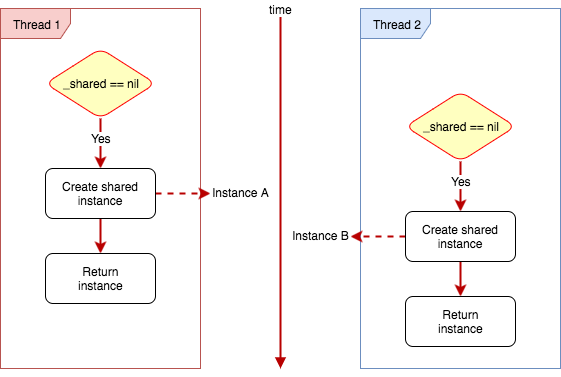
We have our private constructor at the top and a private static variable where we'll keep our instance. In the getter of the 'shared' variable, we're checking to see if we already have a shared instance. If we do, we return it, if we don't, we create it. We have to be careful here because this is not a thread safe way of creating singletons. You might actually end up having multiple instances of a singleton, let's see how on this diagram:
Go through the code above, and follow the diagram. Thread 1 will check the shared instance and it will see that it's nil, then it will create a new object and assign it to that shared instance, at the same time Thread 2 will do the same, but let's assume the Thread 2 is running slightly after Thread 1. In that time window where Thread 1 checks if the instance is nil and assigns a new object to the shared instance Thread 2 will enter the if statement because the shared instance is still not being set. This can easily be solved with a dispatch barrier. We simply raise the barrier to make sure no code is being executed while the object is being created, once we raise the barrier we check again if the shared instance is nil (if we don't we would still end up in the same scenario depicted on the graph above... thanks, mbarnach :) ). Now object creation time no longer plays a role in our lazy instantiation, and it's not a problem.
Just to clean up our keychain a bit, we need to control the write access. We don't want multiple threads writing into the keychain at the same time. Since we're using subscripting this is actually pretty simple to do:
subscript(key: String) -> String? {
        get {
            return load(withKey: key)
        } set {
            DispatchQueue.global().sync(flags: .barrier) {
                self.save(string: newValue, forKey: key)
            }
        }
    }
So we just raise the dispatch barrier when saving.