iOS Application Security Part 1 - Setting Up a Testing Environment for iOS Platform
Liban Mohamud

Welcome to my article on “iOS Application Security Testing Series”
In this series, I will provide information on iOS Application Security testing, starting from the Setting Up a Testing Environment for iOS Platform, all the way to Testing Data Storage, Cryptography, Authentication, Network Communication, and Reverse Engineering.
In this part, we will cover Setting Up a Testing Environment, and in the future parts of this series, we will look deeper into the tools and techniques required to perform penetration testing and Vulnerability assessment on iOS Applications.
Audience and Expectations
The intended audience is diverse and ranges from iOS developers to security professionals –The practices recommended in this series are designed to be highly technical and readers are assumed to have a basic understanding of secure coding, iOS Security Architecture, and Platform Overview.
Jailbreaking an iOS Device
If you are serious about iOS security, then having a jailbroken device is a must. I’d tell you all about the Jailbreaking process, but I think Wikipedia has that part covered for me.
 Jailbreaking methods vary across iOS versions. The best choice is to check if a public jailbreak is available for your iOS version. Beware of fake tools and spyware that is often distributed around the Internet, often hiding behind domain names like the jailbreaking group/author.
Let's say you have a device running iOS 9.0, for this version you'll find a jailbreak (Pangu 1.3.0), at least for 64-bit devices. In the case that you have another version for which there's not a jailbreak available, you could still jailbreak it if you downgrade/upgrade to the target jailbreak-able iOS version (via IPSW download and iTunes). However, this might not be possible if the required iOS version is not signed anymore by Apple.
The iOS jailbreak scene evolves so rapidly that it is difficult to provide up-to-date instructions. However, I can point you to some, at the time of this writing, reliable sources:
Disclaimer you could end up bricking your iOS device!
Setting up Tradecraft tools
Now that you are done jailbreaking your device, the next step is to install tools. The first and foremost thing, however, is to install OpenSSH on your device. This will allow you to login to your jailbroken device and perform various other tasks as we will see in this article later. Go to Cydia, tap on the search tab on the bottom and search for OpenSSH.
Jailbreaking methods vary across iOS versions. The best choice is to check if a public jailbreak is available for your iOS version. Beware of fake tools and spyware that is often distributed around the Internet, often hiding behind domain names like the jailbreaking group/author.
Let's say you have a device running iOS 9.0, for this version you'll find a jailbreak (Pangu 1.3.0), at least for 64-bit devices. In the case that you have another version for which there's not a jailbreak available, you could still jailbreak it if you downgrade/upgrade to the target jailbreak-able iOS version (via IPSW download and iTunes). However, this might not be possible if the required iOS version is not signed anymore by Apple.
The iOS jailbreak scene evolves so rapidly that it is difficult to provide up-to-date instructions. However, I can point you to some, at the time of this writing, reliable sources:
Disclaimer you could end up bricking your iOS device!
Setting up Tradecraft tools
Now that you are done jailbreaking your device, the next step is to install tools. The first and foremost thing, however, is to install OpenSSH on your device. This will allow you to login to your jailbroken device and perform various other tasks as we will see in this article later. Go to Cydia, tap on the search tab on the bottom and search for OpenSSH.
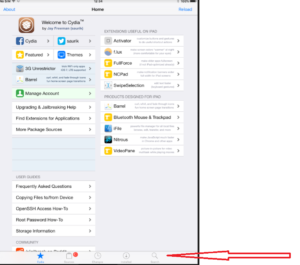 Tap on OpenSSH and on the next view tap on install. Tap on Confirm on the next view to confirm this action.
One of the most popular repositories is BigBoss Recommended tools package which comes with a list of hacker tools. To install BigBoss Recommended tools just search for it in Cydia and tap on install.
Tap on OpenSSH and on the next view tap on install. Tap on Confirm on the next view to confirm this action.
One of the most popular repositories is BigBoss Recommended tools package which comes with a list of hacker tools. To install BigBoss Recommended tools just search for it in Cydia and tap on install.
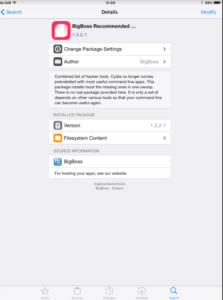 Cydia allows you to manage repositories. Before we log in to the device, we should install some other command line tools.
 Once this is done, do an apt-get update to get the latest packages lists.
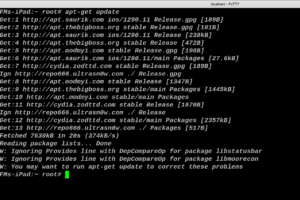 It wouldn’t be a bad idea to do an apt-get upgrade also, this will fetch the new versions of packages that are already existing on the machine and don’t have the latest version using the information contained from doing an apt-get update.
 Copying App Data Files
Files belonging to an app are stored in the app's data directory. To identify the correct path, ssh into the device and retrieve the package information using IPA Installer Console:
Copying App Data Files
Files belonging to an app are stored in the app's data directory. To identify the correct path, ssh into the device and retrieve the package information using IPA Installer Console:
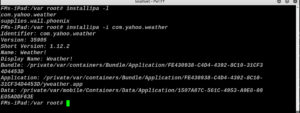 You can now simply archive the data directory and pull it from the device using scp with following command scp -P 5000 root@localhost:/tmp.
The next thing to do is to install an app. The easiest way of installing a tool is to download the binary from its GitHub repo: and using SCP to push.
Further Reading
There are not a lot of resources as far as iOS Security is concerned but here are some of the very good ones.
You can now simply archive the data directory and pull it from the device using scp with following command scp -P 5000 root@localhost:/tmp.
The next thing to do is to install an app. The easiest way of installing a tool is to download the binary from its GitHub repo: and using SCP to push.
Further Reading
There are not a lot of resources as far as iOS Security is concerned but here are some of the very good ones.
Jailbreaking methods vary across iOS versions. The best choice is to check if a public jailbreak is available for your iOS version. Beware of fake tools and spyware that is often distributed around the Internet, often hiding behind domain names like the jailbreaking group/author.
Let's say you have a device running iOS 9.0, for this version you'll find a jailbreak (Pangu 1.3.0), at least for 64-bit devices. In the case that you have another version for which there's not a jailbreak available, you could still jailbreak it if you downgrade/upgrade to the target jailbreak-able iOS version (via IPSW download and iTunes). However, this might not be possible if the required iOS version is not signed anymore by Apple.
The iOS jailbreak scene evolves so rapidly that it is difficult to provide up-to-date instructions. However, I can point you to some, at the time of this writing, reliable sources:
Disclaimer you could end up bricking your iOS device!
Setting up Tradecraft tools
Now that you are done jailbreaking your device, the next step is to install tools. The first and foremost thing, however, is to install OpenSSH on your device. This will allow you to login to your jailbroken device and perform various other tasks as we will see in this article later. Go to Cydia, tap on the search tab on the bottom and search for OpenSSH.
Tap on OpenSSH and on the next view tap on install. Tap on Confirm on the next view to confirm this action.
One of the most popular repositories is BigBoss Recommended tools package which comes with a list of hacker tools. To install BigBoss Recommended tools just search for it in Cydia and tap on install.
Cydia allows you to manage repositories. Before we log in to the device, we should install some other command line tools.
- Adv-cmds: Advanced command-line. Includes finger, last, lsvfs, md and ps.
- IPA Installer Console: Tool for installing IPA application packages from the command line. Package name is com.autopear.installipa.
- Class Dump: A command-line tool for examining the Objective-C runtime information stored in Mach-O files.
- Substrate: A platform that makes it easier to develop third-party add-ons for iOS.
- cycript: Cycript is an inlining, optimizing, JavaScript-to-JavaScript compiler and immediate mode console environment that can be injected into running processes.
- AppList: Allows developers to query the list of installed apps and provide a preference pane based on that information.
- PreferenceLoader: Is a MobileSubstrate based utility that allows developers to add entries to the Settings application, similar to the SettingsBundles that AppStore apps use.
- AppSync Unified: Allows you to sync and install unsigned iOS applications.
Once this is done, do an apt-get update to get the latest packages lists.
It wouldn’t be a bad idea to do an apt-get upgrade also, this will fetch the new versions of packages that are already existing on the machine and don’t have the latest version using the information contained from doing an apt-get update.
Copying App Data Files
Files belonging to an app are stored in the app's data directory. To identify the correct path, ssh into the device and retrieve the package information using IPA Installer Console:
You can now simply archive the data directory and pull it from the device using scp with following command scp -P 5000 root@localhost:/tmp.
The next thing to do is to install an app. The easiest way of installing a tool is to download the binary from its GitHub repo: and using SCP to push.
Further Reading
There are not a lot of resources as far as iOS Security is concerned but here are some of the very good ones.
- Pentesteracademy has a very detailed course on iOS security.
- DVIA - Damn Vulnerable iOS App for learning
- Owasp-Mstg OWASP Mobile Security Testing Guide.
- Charlie Miller, Dionysus Blazakis, Dino Dai Zovi, Stefan Esser, Vincenzo Iozzo, Ralf-Philipp Weinmann (2012) iOS Hacker's Handbook. Wiley. Available at: http://www.wiley.com/WileyCDA/WileyTitle/productCd-1118204123.html
- David Thiel (2016) iOS Application Security, The Definitive Guide for Hackers and Developers. no starch press. Available at: https://www.nostarch.com/iossecurity
- Jonathan Levin (2013), Mac OS X and iOS Internals, Wiley. Available at: http://newosxbook.com/index.php