Design Patterns in Swift: Iterator Pattern
Dejan Agostini

Iterator pattern is a perfect choice for you when you need to traverse a collection of objects. It's fairly simple and it's so widely used that most collection types implement this pattern in the swift standard library. In this article you'll learn how to implement the iterator pattern. This will also help you understand how the built-in iterators work and will enable you to build your custom iterators if the system iterators are not sufficient for your needs.
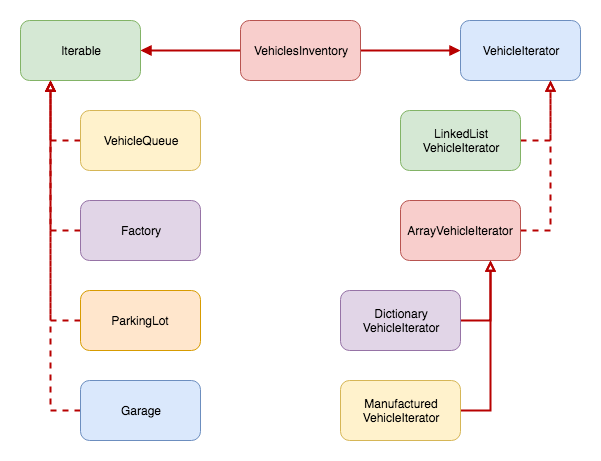 Our 'VehiclesInventory' will use 'VehicleQueue', 'Factory', 'ParkingLot' and 'Garage' classes. Each of those classes will store vehicles in a different collection type. From the point of 'VehiclesInventory' it won't matter what the underlying collection is. It won't be aware of the implementation details.
In order to do this we'll need four different iterators, one for each collection type that we'll be using. Let's go over some code.
Our 'VehiclesInventory' will use 'VehicleQueue', 'Factory', 'ParkingLot' and 'Garage' classes. Each of those classes will store vehicles in a different collection type. From the point of 'VehiclesInventory' it won't matter what the underlying collection is. It won't be aware of the implementation details.
In order to do this we'll need four different iterators, one for each collection type that we'll be using. Let's go over some code.
Iterator Pattern
Of all the patterns we covered so far this is one of the simpler ones. As the name suggests, the pattern enables you to iterate over a collection of elements. Here is the definition from the gang of four:Provide a way to access the elements of an aggregate object sequentially without exposing its underlying representation.This is all the pattern is doing. It gives you an interface that will enable you to iterate over collections regardless of how they're implemented in the background. Imagine you had a custom class that holds a collection of vehicles, if your class implemented this pattern then it wouldn't matter to the other classes how you're storing these vehicles. You could store them in an array, dictionary, linked list, it's up to you. We'll see this in the example later.
Our Example
In the example we'll use four different classes and store four different collections of vehicles... Array, dictionary, linked list and a wrapper object. We'll have one class that will print out all the vehicles from these classes. Let's see it on a diagram:
Our 'VehiclesInventory' will use 'VehicleQueue', 'Factory', 'ParkingLot' and 'Garage' classes. Each of those classes will store vehicles in a different collection type. From the point of 'VehiclesInventory' it won't matter what the underlying collection is. It won't be aware of the implementation details.
In order to do this we'll need four different iterators, one for each collection type that we'll be using. Let's go over some code.
VehicleIterator
This is a simple protocol that our custom iterators will implement:protocol VehicleIterator
{
func next() -> Vehicle?
}
As you can see, the protocol has only one function that will return the next element in the collection, or 'nil' if there are no more elements to return.
We'll implement a custom iterator for each of the collection types that we'll be using. Our array iterator looks like this:
class ArrayVehicleIterator: VehicleIterator
{
    private var cursor: Int?
    private let items: [Vehicle]
    init(_ items: [Vehicle]) {
        self.items = items
    }

    func next() -> Vehicle? {
        if let idx = getNextCursor(cursor) {
            self.cursor = idx
            return self.items[idx]
        }
        return nil
    }

    private func getNextCursor(_ cursor: Int?) -> Int? {
        if var idx = cursor, idx < items.count - 1 {
            idx += 1
            return idx
        } else if cursor == nil, items.count > 0 {
            return 0
        } else {
            return nil
        }
    }
}
We initialise this iterator with an array of vehicles and we keep a cursor to the current element in the array. Every call to the 'next' function will move the cursor by one. And before you say it, we could have implemented this with generics, but I wanted to keep the example as simple as possible and focus on the pattern itself.
Let's look at another iterator. The linked list iterator:
class LinkedListVehicleIterator: VehicleIterator
{
    private var cursor: LinkedList<Vehicle>?
    private let items: LinkedList<Vehicle>
    init(_ items: LinkedList<Vehicle>) {
        self.items = items
        self.cursor = self.items
    }

    func next() -> Vehicle? {
        let vehicle = self.cursor?.item
        self.cursor = self.cursor?.nextItem
        return vehicle
    }
}
Linked list implementation is obviously completely different from the array implementation. We still need to keep a reference to the current element (cursor) but it's much simpler.
By now you get the idea :) Let me show you one more, slightly different, iterator:
class ManufacturedVehicleIterator: ArrayVehicleIterator
{
    init(_ items: [ManufacturedVehicle]) {
        let items: [Vehicle] = items.map { $0.vehicle }
        super.init(items)
    }
}
'ManufacturedVehicleIterator' is subclassing the 'ArrayVehicleIterator' and in the constructor it's extracting the vehicles out of the object that has a vehicle as one of its properties. We certainly could have implemented this without subclassing the 'ArrayVehicleIterator', keep an internal array of 'ManufacturedVehicles' and return the vehicle property of each array element when calling the 'next' function. This is simply another way of implementing it.
Iterable
Iterable is a very simple protocol that will have only one function for generating iterators:protocol Iterable {
func makeIterator() -> VehicleIterator
}
The classes that contain your business logic will implement this protocol. For the sake of argument, let's say we have a class named 'Factory' that's responsible for producing vehicles on the assembly line. That class could look like this:
class Factory: Iterable
{
    private let items: [ManufacturedVehicle]
    init(_ items: [ManufacturedVehicle]) {
        self.items = items
    }

    // This class could be responsible for producing vehicles, for example...

    func makeIterator() -> VehicleIterator {
        return ManufacturedVehicleIterator(items)
    }
}
The class has an array of 'ManufacturedVehicle' objects, one of the properties of the object is the actual vehicle we're interested in. We have a custom iterator for the 'ManufacturedVehicle' array and we simply instantiate it in the 'makeIterator' function. The caller of this function won't know what iterator it's using, and it won't care.
One other fictive implementation might use a dictionary to store the vehicles internally. Let's call this one 'Garage':
class Garage: Iterable
{
    private let cars: [String : Vehicle]
    init(_ cars: [String : Vehicle]) {
        self.cars = cars
    }

    // Might be your personal garage, might be your neighbours'... This is another class that will contain your business logic...

    func makeIterator() -> VehicleIterator {
        return DictionaryVehicleIterator(cars)
    }
}
Here we see that we're returning another custom iterator, the dictionary iterator.
Using the Iterators
Using the iterators is actually quite simple. We have a class called 'VehiclesInventory' that we use to demonstrate this:class VehiclesInventory
{
// Create the test objects... Usually you would inject these in the constructor.
private let queue = VehicleQueue(VehiclesFactory.getVehiclesList())
private let factory = Factory(VehiclesFactory.getFactoryVehicles())
private let parking = ParkingLot(VehiclesFactory.getVehiclesArray())
private let garage = Garage(VehiclesFactory.getVehiclesDictionary())
func printVehiclesInventory() {
print("==========QUEUE============")
printVehicles(iterator: queue.makeIterator())
print("==========FACTORY==========")
printVehicles(iterator: factory.makeIterator())
print("==========PARKING==========")
printVehicles(iterator: parking.makeIterator())
print("==========GARAGE===========")
printVehicles(iterator: garage.makeIterator())
}
private func printVehicles(iterator: VehicleIterator) {
while let item = iterator.next() {
print(item.name)
}
}
}
This class has no idea how the vehicles are being stored in each of the respective classes. And it shouldn't care. Imagine if we exposed our implementation and instead of returning an iterator from the 'Garage' class we returned the dictionary... If we ever changed that dictionary to an array we would have two classes to modify instead of one. It's best to keep yourself exposed as little as possible. We all know how easy it is to introduce bugs when modifying existing code. This way we're simply making sure that we modify as little code as possible in the future.
Testing It Out
In the code snippet above you can see that we're using a factory to create our collections. This is the factory we're using:class VehiclesFactory
{
static func getVehiclesArray() -> [Vehicle] {
return [
VehicleItem(id: 0, name: "Red Car", make: "Ford", model: "Mondeo", registration: "123aa4"),
VehicleItem(id: 1, name: "Blue Car", make: "Ford", model: "Fiesta", registration: "432dd"),
VehicleItem(id: 2, name: "Green Car", make: "Nissan", model: "Leaf", registration: "hhg654"),
VehicleItem(id: 3, name: "Rusty Car", make: "Ford", model: "T", registration: "855tes"),
VehicleItem(id: 4, name: "Red Pickup", make: "Toyota", model: "Hilux", registration: "kjjg665"),
VehicleItem(id: 5, name: "Jude's Candy Van", make: "Toyota", model: "Hiace", registration: "3321jjg"),
]
}
static func getFactoryVehicles() -> [ManufacturedVehicle] {
return [
FactoryVehicle(date: Date(), assemblyLine: "Detroid", passedQA: true, qaPerformedBy: "Jude", vehicle: VehicleItem(id: 9, name: "New Shiny Car", make: "GM", model: "Top Secret", registration: "xx4433")),
FactoryVehicle(date: Date(timeIntervalSinceNow: -1000), assemblyLine: "Mexico", passedQA: true, qaPerformedBy: "Nenad", vehicle: VehicleItem(id: 88, name: "Fiery Red", make: "Opel", model: "Astra", registration: "55422")),
FactoryVehicle(date: Date(timeIntervalSinceNow: -4444), assemblyLine: "Germany", passedQA: false, qaPerformedBy: "Hans", vehicle: VehicleItem(id: 66, name: "Space Car", make: "BMW", model: "X0", registration: "Mars-1"))
]
}
static func getVehiclesList() -> LinkedList<Vehicle> {
let head = LinkedList<Vehicle>(VehicleItem(id: 44, name: "Pac Man", make: "Mini", model: "Cooper", registration: "887744da"))
head.nextItem = LinkedList<Vehicle>(VehicleItem(id: 33, name: "Little Thumper", make: "Rolls Royce", model: "Royal", registration: "blue1"))
head.nextItem?.nextItem = LinkedList<Vehicle>(VehicleItem(id: 90, name: "Green Beast", make: "Ford", model: "Mustang", registration: "4213245"))
head.nextItem?.nextItem?.nextItem = LinkedList<Vehicle>(VehicleItem(id: 77, name: "Big Blue", make: "Smart", model: "forTwo", registration: "09876"))
return head
}
static func getVehiclesDictionary() -> [String : Vehicle] {
return [
"slot 1" : VehicleItem(id: 55, name: "My Car", make: "Lada", model: "Niva", registration: "554433"),
"slot 2" : VehicleItem(id: 66, name: "Not My Car", make: "Lamborghini", model: "Diablo", registration: "RichInSpirit")
]
}
}
From the 'AppDelegate' we're simply calling the 'printVehiclesInventory' functions and the output looks like this:
==========QUEUE============
Pac Man
Little Thumper
Green Beast
Big Blue
==========FACTORY==========
New Shiny Car
Fiery Red
Space Car
==========PARKING==========
Red Car
Blue Car
Green Car
Rusty Car
Red Pickup
Jude's Candy Van
==========GARAGE===========
Not My Car
My Car
That's it.