Design Patterns in Swift: State Pattern
Dejan Agostini

If your objects can have multiple states, then you should consider implementing a state pattern. In this article we'll cover some theory on state pattern, and then we'll go over an example on how to implement it. Hopefully, by the end of the article, you'll be familiar with the state pattern.
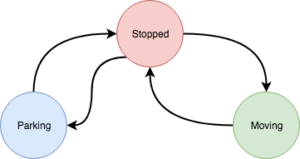 Vehicle can change states, but there are some rules to follow. For example, you can't move from a moving state to a parking state directly, you have to transition to a stopped state first.
If you're thinking about how to implement this behaviour into your vehicle class, you might be thinking of using enums to store the state information in a private variable of the vehicle class. Imagine how your functions would look like, you would end up with a lot of switch cases in your code. Your vehicle class would become pretty big and difficult to maintain.
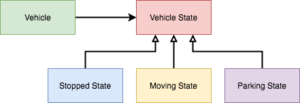
What we'll do is separate each of the 'cases' or states into a class of its own. The vehicle will have a reference to the current state of the vehicle, and the state classes will have a reference back to the vehicle. This will allow them to control the current state of the vehicle. Here's a simple diagram of our class hierarchy:
Vehicle can change states, but there are some rules to follow. For example, you can't move from a moving state to a parking state directly, you have to transition to a stopped state first.
If you're thinking about how to implement this behaviour into your vehicle class, you might be thinking of using enums to store the state information in a private variable of the vehicle class. Imagine how your functions would look like, you would end up with a lot of switch cases in your code. Your vehicle class would become pretty big and difficult to maintain.
What we'll do is separate each of the 'cases' or states into a class of its own. The vehicle will have a reference to the current state of the vehicle, and the state classes will have a reference back to the vehicle. This will allow them to control the current state of the vehicle. Here's a simple diagram of our class hierarchy:
 Let's see this in action and get coding...
The State Pattern
As you've worked on your projects, you've probably encountered classes that had internal states. Let's say you have a class for downloading large images from a server. This class could be in multiple different states: requesting, downloading, processing, saving... to name a few. In our examples we'll use a vehicle. Our vehicle can be in a stopped state, it can be moving or automatically parking. The vehicle will have its functions, like brake or park. Depending on the state the vehicle is in, calling the brake function will have different effects. There's no effect on calling the brake function if the vehicle is stopped and calling a brake function on a vehicle that's automatically parking will cancel the parking operation. The vehicle will manage its state internally, we won't really know, or care what state it's in. As you've noticed from the above paragraph, calling a function will produce different results based on the state the object is in. From your perspective it will look like the object itself changed. This brings us to the definition of the state pattern:State pattern will allow an object to change its behaviour when its internal state changes. The object will appear to change its class.That pretty much covers the theory. Let's go over some diagrams next.
Vehicle States
We'll implement a state pattern on a vehicle class. Our vehicle will have three distinct states as you can see on this diagram:
Vehicle can change states, but there are some rules to follow. For example, you can't move from a moving state to a parking state directly, you have to transition to a stopped state first.
If you're thinking about how to implement this behaviour into your vehicle class, you might be thinking of using enums to store the state information in a private variable of the vehicle class. Imagine how your functions would look like, you would end up with a lot of switch cases in your code. Your vehicle class would become pretty big and difficult to maintain.
What we'll do is separate each of the 'cases' or states into a class of its own. The vehicle will have a reference to the current state of the vehicle, and the state classes will have a reference back to the vehicle. This will allow them to control the current state of the vehicle. Here's a simple diagram of our class hierarchy:
Let's see this in action and get coding...
The Code
We'll keep things simple. Our vehicle class will have only three functions, a variable to store the speed and some factory methods to create states:import Foundation
protocol VehicleProtocol: class
{
// MARK: - Vehicle State
var speed: Int { get set }
func setState(_ state: VehicleState)
// MARK: - Vehicle Controls
func accelerate()
func brake()
func park()
// MARK: - State Getters
func getStoppedState() -> VehicleState
func getMovingState() -> VehicleState
func getParkingState() -> VehicleState
}
A class that's using the vehicle would normally interact with the vehicle only by calling one of the three 'vehicle controls' functions. The other functions/variables are meant to be used by the state classes.
Calling any of the control functions would just forward that function call to the state, and the current vehicle state would handle it:
// MARK: - Vehicle Controls
func accelerate() {
    state?.accelerate()
}

func brake() {
    state?.brake()
}

func park() {
    state?.park()
}
Our vehicle will also have factory methods that will create vehicle states:
// MARK: - State Getters
func getStoppedState() -> VehicleState {
    return StoppedState(self)
}

func getMovingState() -> VehicleState {
    return MovingState(self)
}

func getParkingState() -> VehicleState {
    return ParkingState(self)
}
Now you're beginning to see the pattern emerging here. Each state class has a pointer back to a vehicle and it can create new states. All that's left is to implement the state classes.
State Classes
We'll use a protocol for our vehicle states:import Foundation
protocol VehicleState
{
init(_ vehicle: VehicleProtocol)
func accelerate()
func brake()
func park()
}
Every state class will have a reference back to the vehicle. And every state class will implement the vehicle control functions. Calling the vehicle control functions will have different meanings for each individual state class, as we'll see in a moment.
Stopped State
Let's check out the simplest of states, the stopped state:class StoppedState: VehicleState
{
private weak var vehicle: VehicleProtocol?
required init(_ vehicle: VehicleProtocol) {
self.vehicle = vehicle
}
func accelerate() {
self.vehicle?.speed += 5
if let movingState = self.vehicle?.getMovingState() {
self.vehicle?.setState(movingState)
}
}
func brake() {
print("Can't brake... Vehicle is already stopped!")
}
func park() {
if let parkingState = self.vehicle?.getParkingState() {
self.vehicle?.setState(parkingState)
parkingState.park()
}
}
}
When the vehicle is in the stopped state calling 'accelerate' will increase the vehicle speed by 5 (kph, mph... it doesn't matter, really). It will also set the new state of the vehicle to the moving state. Calling the 'brake' function will have no effect, because the vehicle is not moving anyway. And calling the 'park' function will begin the automatic parking procedure.
Parking State
Parking state is a bit more interesting:class ParkingState: VehicleState
{
private weak var vehicle: VehicleProtocol?
private var parking: Bool = false
required init(_ vehicle: VehicleProtocol) {
self.vehicle = vehicle
}
func accelerate() {
print("Vehicle is automatically parking, you can't accelerate!")
}
func brake() {
print("Automatic parking has been aborted")
stopParking()
}
func park() {
guard self.parking == false else {
print("Vehicle is already parking")
return
}
print("Vehicle is now parking")
self.parking = true
DispatchQueue.global().asyncAfter(deadline: .now() + 5) {
self.stopParking()
}
}
private func stopParking() {
print("Vehicle has stopped parking")
self.parking = false
if let stoppedState = self.vehicle?.getStoppedState() {
self.vehicle?.setState(stoppedState)
}
}
}
Here, we can see that calling the 'brake' function will stop the parking procedure. And calling 'park' will trigger a chain of events. You could argue that the content of this method might be more suitable for the 'stopped state' but, for the sake of simplicity, let's keep it here.
Moving State
Moving state is also quite simple:class MovingState: VehicleState
{
private weak var vehicle: VehicleProtocol?
required init(_ vehicle: VehicleProtocol) {
self.vehicle = vehicle
}
func accelerate() {
self.vehicle?.speed += 5
}
func brake() {
self.vehicle?.speed -= 5
if self.vehicle?.speed == 0, let stoppedState = self.vehicle?.getStoppedState() {
print("Vehicle braked to a stop")
self.vehicle?.setState(stoppedState)
}
}
func park() {
print("Can't park the vehicle while it's moving. You need to stop first")
}
}
We can see here that we have a piece of logic in the 'brake' function that will change the state of the vehicle to stopped if the speed drops to 0.
Testing It Out
Let's quickly test our vehicle out:private func testVehicle() {
let vehicle = Vehicle()
vehicle.brake()
vehicle.accelerate()
vehicle.accelerate()
vehicle.brake()
vehicle.park() // prints: Can't park the vehicle while it's moving. You need to stop first
vehicle.brake()
vehicle.park()
}
We can see that our first call to the 'park' method will print out a message that the vehicle needs to be stopped and, after we brake, the second call will produce expected results. This simple test demonstrates how our vehicle seems to have changed implementation on the fly. Calling the same method on the same instance of a class is producing different results. And that's the essence of the state pattern.